Upstream+ allows organizations to track specific occurrences important to their day to day operations objectively through the use of Feedback. Upstream+ comes pre loaded with various Feedback items, but organizations can add their own custom Feedback items through the Manage Feedback option. To create/manage Feedback, use the navigation panel and select Administration > Manage Feedback.
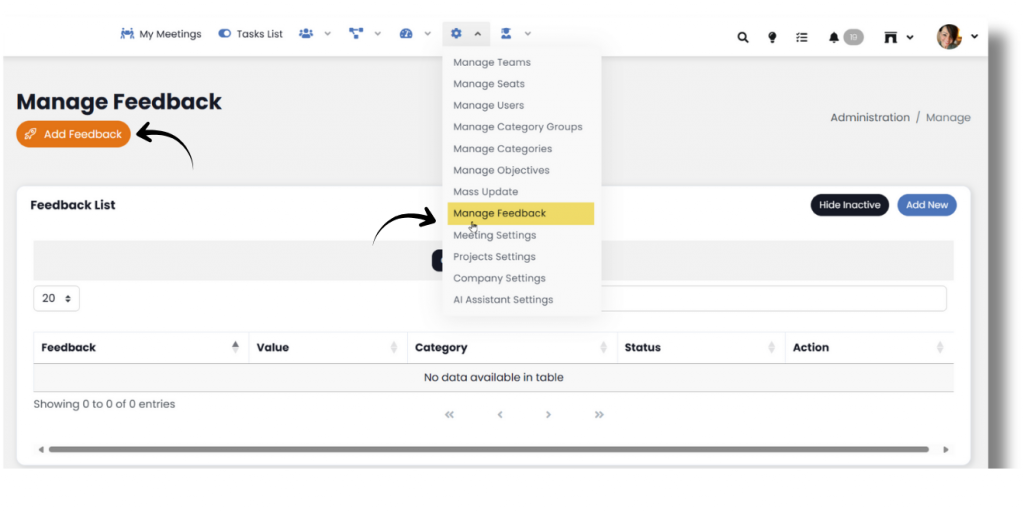
Click Add Feedback
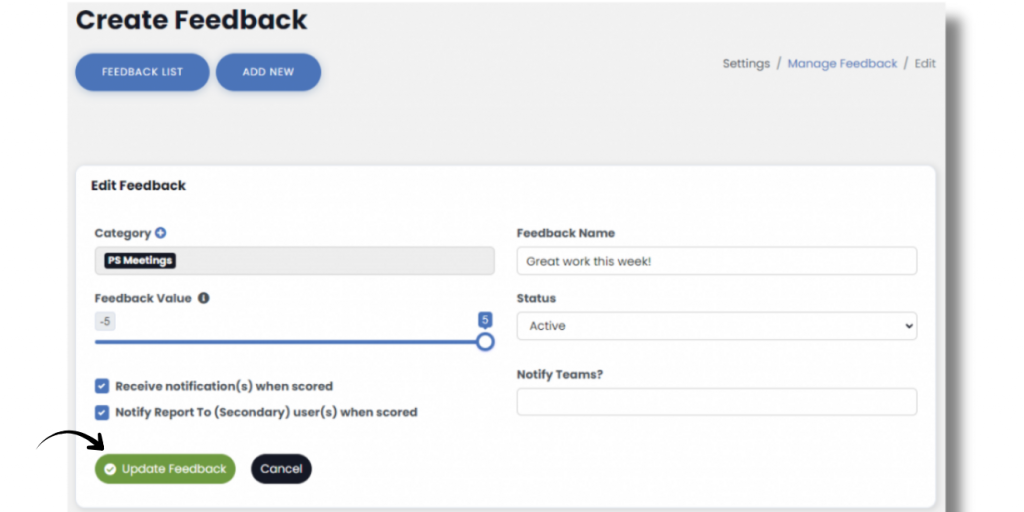
- Fill in Feedback Name
- Select a Category from the Dropdown list
- Use slider to select Numeric Feedback Value between -5 and 5. Any Feedback with a value of 5 is considered a Shout Out
- Select Status Active or Inactive
- Check or Uncheck – Receive notifications when scored (this will notify the user being scored and their manager if they have Feedback Notifications turned on in their profile)
- Check or Uncheck- Notify Report To (Secondary) user(s) when scored (this will notify any secondary reports if they have Feedback Notifications turned on in their profile)
- Click Add (or Update) Feedback
Next up: Mass Update Goals
![[brandname]-feedback-featured](https://securedb.io/kb/wp-content/uploads/2023/04/etho-feedback-featured.jpg "5 Ways to Improve Employee Engagement Through Feedback")