Formula Builder
Formula Goals calculate their values using other Goals and mathematical operators. Instead of entering a value manually, the Goal result is generated from the formula you create.
Creating a Formula
To create a formula Goal:
- Select Enable Formula Builder at the bottom of the Goal creation screen/modal.
- Build your formula using Goals, numbers, and operators.
- Validate the formula.
- Save the Goal.
The calculated result will update based on the values used in the formula.

Adding Goals
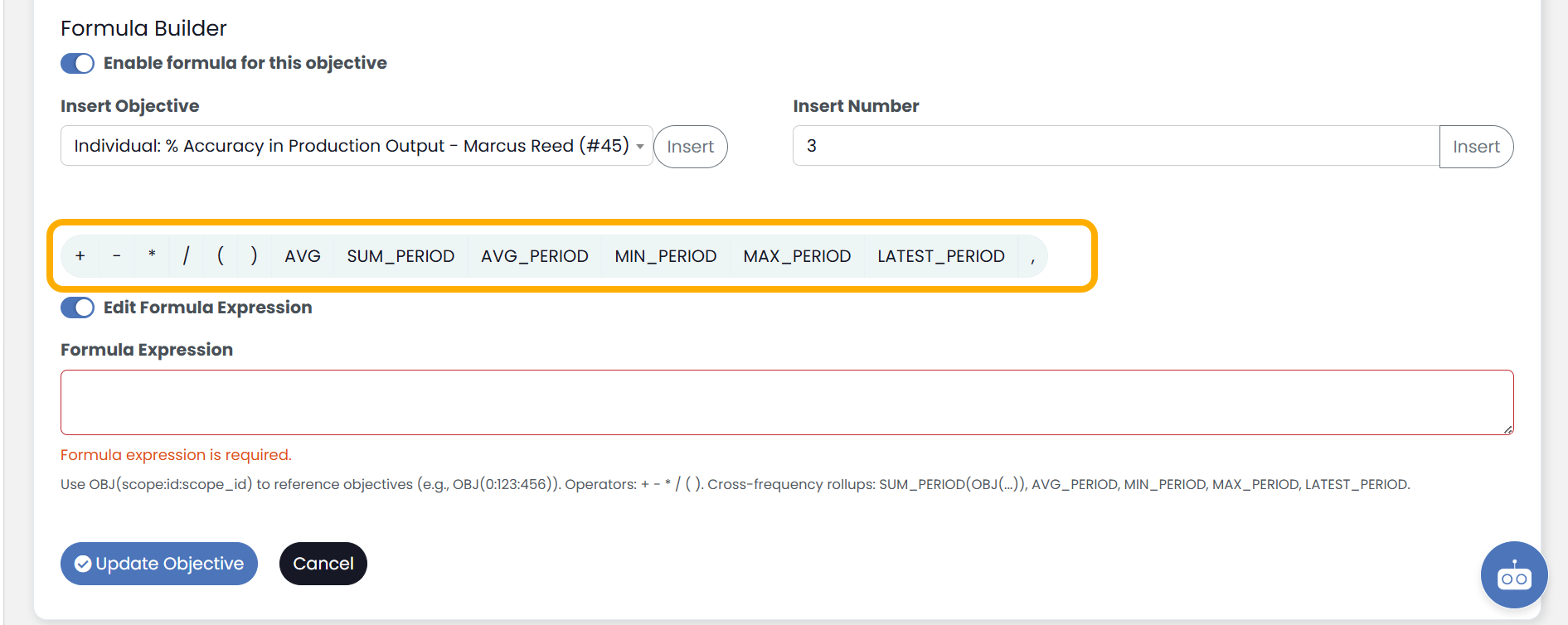
Goals can be inserted directly into the formula.
To add an Goal:
- Place your cursor where the Goal should appear.
- Select the Goal from the available Goal list.
- Select Insert, and the Goal will be inserted into the formula.
When the formula runs, the current value of the selected Goal is used in the calculation.
Using Operators
The Formula Builder supports standard mathematical operators.
Common operators include:
- Addition (+)
- Subtraction (-)
- Multiplication (*)
- Division (/)
- Parentheses ( )
Examples:
- Revenue – Expenses
- Sales / Opportunities
- (Revenue – Expenses) / Revenue
Using parentheses can help control the order in which calculations are performed.
Adding Numbers
Static numbers can be included in formulas alongside Goals.
Examples:
- Revenue * 0.10
- Sales + 100
- (Production Hours / 40) * 100
Numbers entered into the formula remain fixed unless manually changed.
Formula Validation
Formulas must pass validation before they can be saved.
Validation checks for:
- Missing operators
- Missing Goals
- Incomplete expressions
- Invalid characters
- Unmatched parentheses
If validation fails, review the formula and correct any errors before saving.
Formula Results
Formula Goals automatically recalculate based on the values of the Goals included in the formula.
If an Goal used within the formula changes, the formula result will update accordingly.
Things to Know
- Formula Goals are calculated automatically.
- Goals used in a formula must remain active and accessible.
- Parentheses can be used to create more advanced calculations.
- Validation must succeed before a formula Goal can be saved.
- Formula Goals can be used anywhere standard Goals are available throughout the application.