A good Rock has a clear description of its goal, a timeline for completion, and consists of a group of manageable To-Dos that break the process into smaller parts. In some instances, a company or individual user will have proven processes that have to occur multiple times within a year. For those, GoExpand has developed Rock Templates.
Creating a Rock from a Template
Users can easily create a new Rock from a template by selecting a template from the dropdown at the top of the Rock creation screen. Once a template is selected, all settings from the template will automatically load in the new Rock. Users can then edit these settings before creating the Rock. Here are a few things to know when creating a Rock from a template:
- Rock end date and any To-Do deadlines will automatically adjust to the selected start date based on the parameters set in the Rock template.
- To-Do ownership and other details will match what is in the Rock template, so make sure to update as necessary.
- Update the Rock name, subtitle, and description to match your desired outcome.
Creating a Rock Template
To create a Rock Template, navigate to Rocks >> Rocks List and click the Create Template button at the top.

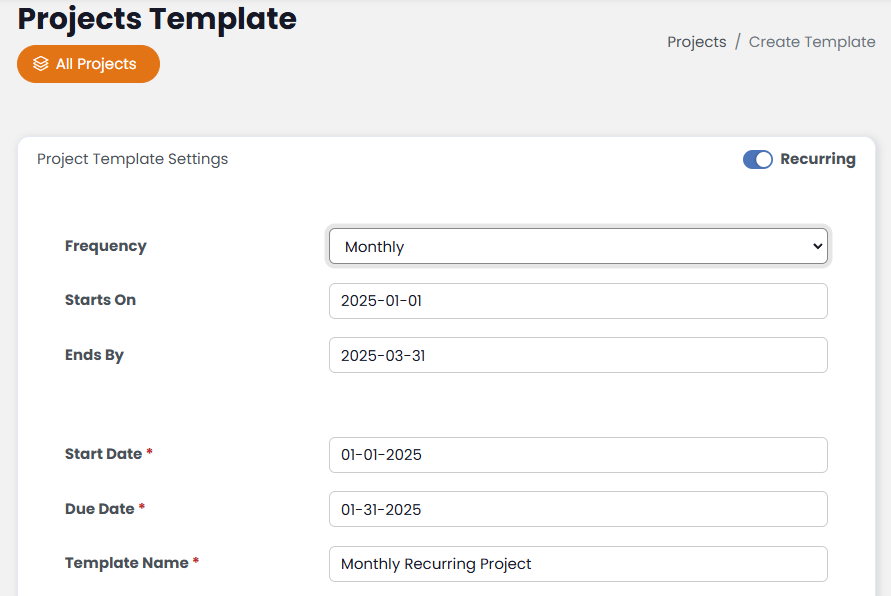
From the next window, the process is almost exactly the same as creating a new Rock. The only exception is that Rock Templates can be set to recur. To set a Rock template to recur, simply click the “Recurring” toggle at the top-right of the block and setup the recurrence settings.
- Frequency: How often the Rock should recur.
- Starts On: When the first iteration of the Rock will begin.
- Ends On: When the automatic recurrence will end.
In the example below, this Rock will recur each month for three months (Jan-March)
Benefits of Using Recurring Rock Templates
- Consistency: Ensure that critical workflows are followed accurately every time.
- Efficiency: Save time by automating the creation of recurring Rocks and To-Dos.
- Accountability: Track and manage recurring To-Dos more effectively with automated scheduling and assignments.