Connecting Your OpenAI API Account to SecureDB
SecureDB uses an OpenAI API key to power AI features within your organization.
For company integrations, we recommend using an OpenAI Service Account API key rather than an API key belonging to an individual employee. A service account is associated with an OpenAI API project and is designed for application-to-application access. OpenAI Help Center
Important: Your company’s ChatGPT workspace and its OpenAI API Platform organization are separate. Being a member of a company ChatGPT workspace does not automatically give you access to the company’s API organization or projects. OpenAI Help Center
Before You Begin
Go to the OpenAI Platform and sign in using your company account.
Open the organization selector and confirm that you can see your company’s OpenAI API organization.
If you see only Personal and do not see your company organization, contact the person who manages your company’s OpenAI API account and ask to be added to:
- The company’s OpenAI API organization.
- The appropriate API project for SecureDB.
An organization owner may need to complete these steps for you. OpenAI organization and project owners can manage members and create service accounts. OpenAI Help Center
Create a Service Account API Key
Once you have access to the correct company organization:
- Sign in to the OpenAI Platform.
- Select the correct company organization.
- Select the API project that will be used with SecureDB.
- If your company does not already have an appropriate project, an organization owner can create one.
- A dedicated project such as SecureDB is recommended so API usage and access can be managed separately.
- Open Organization Settings.
- Select the appropriate Project.
- Open Members.
- Click + Service account.
- Give the service account a recognizable name, such as SecureDB or SecureDB Production.
- Click Create.
- OpenAI will immediately generate an API secret key. Copy the key before closing this window.
For security reasons, OpenAI will not display the secret key again after it has been created. If the key is lost, a new one must be generated. Service-account keys are scoped to the project in which they are created. OpenAI Help Center
If You Cannot Create a Service Account
Only users with the appropriate organization or project-owner permissions can create service accounts. OpenAI Help Center
Ask your OpenAI administrator:
“Please create a service account in our OpenAI API project for SecureDB and provide the API key through an approved secure method.”
Do not send API keys through ordinary email or chat unless your organization’s security policy specifically allows it.
Connect the API Key to SecureDB
After creating the service-account key:
- Log in to SecureDB.
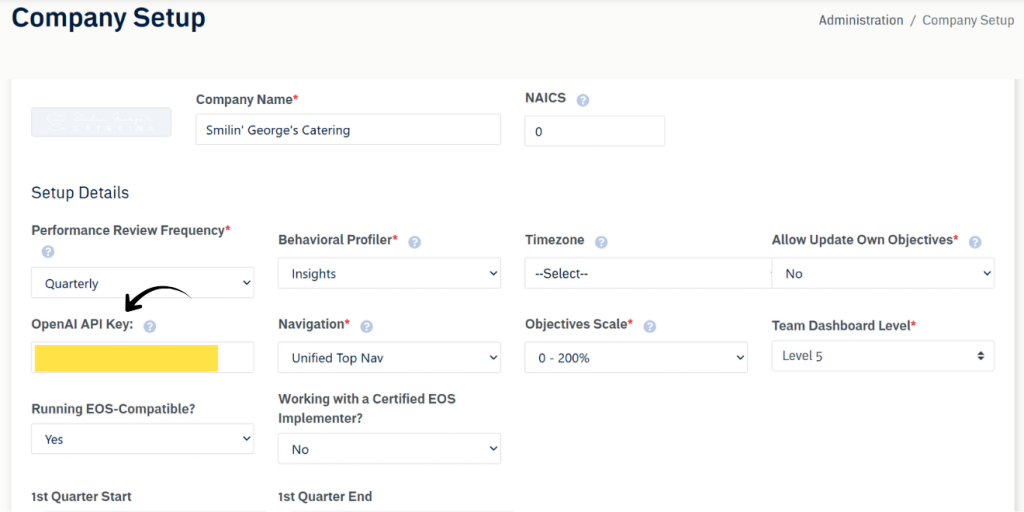
- Navigate to Administration → Company Setup.
- Locate the OpenAI API Key field.
- Paste the new Service Account API key into the field.
- Save the Company Setup changes.
- Open the AI Assistant and perform a simple test to confirm the connection is working.
Replacing an Existing API Key
If an OpenAI API key has already been configured, SecureDB will display only a masked version of the existing key.
You do not need to remove the previous key before replacing it.
Simply paste the new API key into the OpenAI API Key field and save your changes. SecureDB will securely replace the previous stored key with the new one.
If your organization already has AI Assistant Knowledge Base documents, SecureDB will use the new OpenAI connection for the associated OpenAI file and knowledge-base resources.
API Billing
OpenAI API billing is separate from ChatGPT subscriptions and ChatGPT workspace billing. Your company’s OpenAI API organization must have API billing configured for API requests to operate successfully. OpenAI Help Center
If the new key is accepted but SecureDB‘s AI features return billing or quota errors, have an OpenAI organization owner review the organization’s Billing, Usage, and Limits settings. OpenAI Help Center
Security Recommendations
- Use a company-owned service account rather than an individual employee’s personal API key.
- Never place an API key in documentation, screenshots, email, or unsecured messaging.
- Copy the service-account secret when it is generated and store it securely.
- If a key is compromised, revoke it in the OpenAI Platform and generate a replacement.
- Remove or revoke obsolete employee-owned API keys after the SecureDB connection has been successfully migrated.
For assistance or further questions, please contact our Support team.