Using a Service Account API key is essential for security and consistent access to your entire workspace in Upstream+, ensuring all meeting notes and data are captured effectively.
Generating your Workspace API Key
Follow these steps to generate your an OpenAI Workspace API Key.
- Go to OpenAI Platform and log into your OpenAI account.
- Click the Create new secret key button.
- Provide a recognizable name for your key (optional), then click Create secret key.
- Immediately copy the generated API key. Store it securely, as you won’t be able to view it again.
- Click Save to finalize the integration.
Important Security Tips:
- Keep your API key confidential and store it securely.
- If your key is compromised, revoke it immediately from your OpenAI account and create a new one.
Connecting Workspace to Upstream+
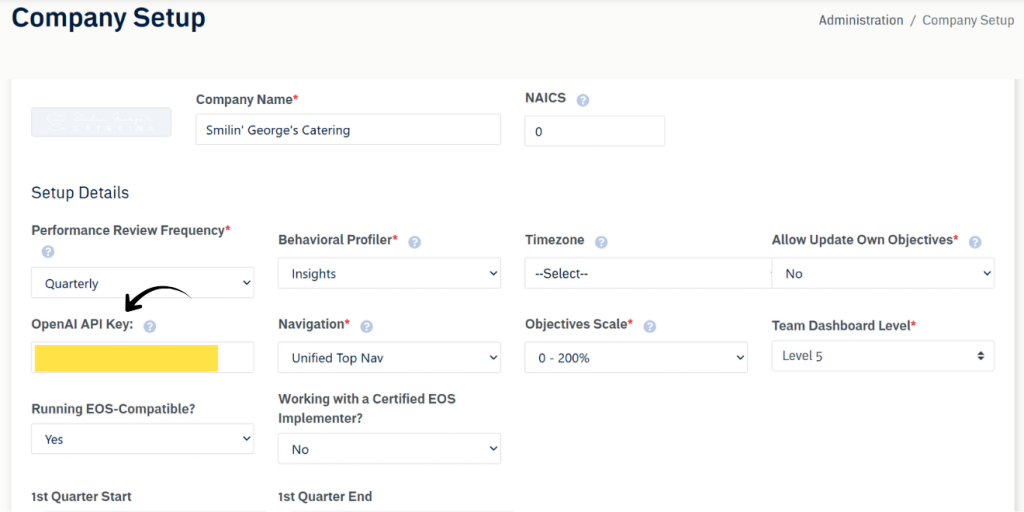
- Log in to Company Settings: Access the Upstream+ platform and navigate to the company settings page.
- Navigate to API Keys: Find the input labeled OpenAI API Key
- Enter the Service Account API Key: Input the service account API key in the designated field.
- Verify Permissions: Ensure the service account key has the correct permissions to access all necessary data across your workspace.
For assistance or further questions, please contact our Support team.